
A Guide to USPS Informed Delivery For Transactional Mail

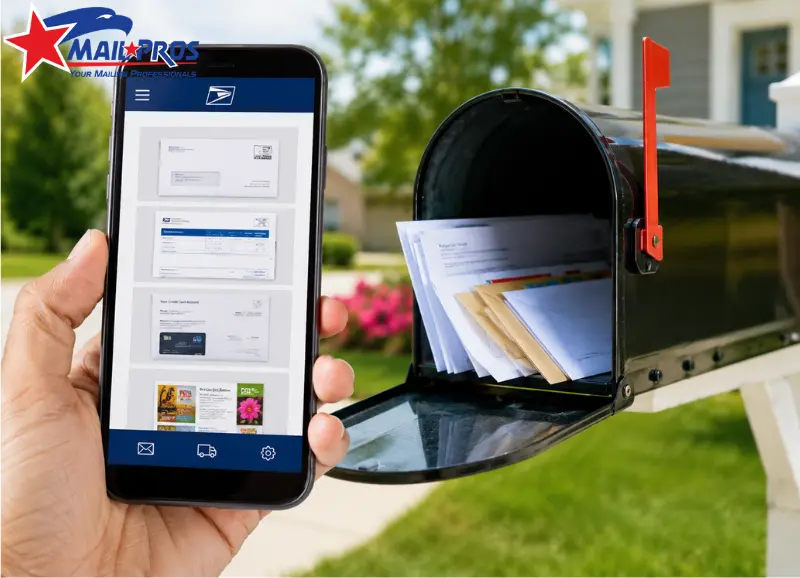
A statement, invoice, renewal notice, or account letter may look routine in a mailstream, yet the recipient may be waiting for it. USPS informed delivery adds a digital preview to that physical journey. Eligible users can see images of qualifying incoming letter-size pieces through a Daily Digest email, online dashboard, or the USPS mobile app.
For transactional mail, the benefit is recognition without exposing the sealed document. When an eligible interactive campaign is used, the sender can also connect the physical communication to a related online destination.
According to USPS, informed delivery notifications have a 63.4% average daily open rate, 91% of surveyed consumers are satisfied or very satisfied with the service, and campaigns generated 37.4 billion impressions in the past year. These are program-level figures, not guaranteed results for an individual sender.
What the Recipient Actually Sees?
USPS informed delivery normally shows a grayscale image of the exterior, address side of an eligible letter-size mailpiece processed through USPS automated equipment. It does not display the statement, bill, notice, or other document sealed inside.
That makes the envelope part of the customer experience. A clear sender name can help someone recognize important postal mail, while balances, medical information, claim status, full account numbers, and other private data remain inside.
A mail preview is also different from confirmed mail delivery. USPS advises users that a piece shown in the service may arrive several days later. Customer-service teams should avoid treating the preview as proof that a document has reached the mailbox.
How Transactional Mail Moves From File to Preview

The strongest workflow treats the printed piece, postal preparation, and digital experience as one connected process.
Start With Accurate Recipient Data
Names, addresses, ZIP Codes, customer identifiers, and variable fields need to stay matched through insertion. For automation mailings, USPS requirements can include CASS-certified address data, correct delivery-point information, and an Intelligent Mail barcode.
Record-level checks matter because a mismatch can send information to the wrong household. The guide to variable data printing for scalable personalization explains how changing fields can be controlled while an approved layout stays consistent.
Build a Privacy-Safe Envelope
The outside should identify the sender without exposing more than the recipient needs to see. A utility statement can show the utility name without printing the balance. An insurance letter can identify the carrier without revealing a claim type.
Window envelopes should be tested with finished samples. Fold movement or insert shift can expose text that looks hidden on screen, and the exterior may become part of the digital mail experience.
Prepare the Piece for USPS Processing
Commercial USPS mail may use Intelligent Mail barcodes, electronic documentation, presort, and other preparation steps depending on the mailing. When an eligible letter passes through automated equipment, USPS can create the exterior image associated with the recipient’s delivery point.
USPS informed delivery then makes that image available to an enrolled recipient through supported channels. The service currently includes email, the web experience, and the Informed Delivery mobile app.
Connect the Preview to a Relevant Action
An eligible campaign can include a ride-along image and an interactive link. USPS requires campaign links to use HTTPS and directs them to a landing page related to the physical piece or the mailer’s homepage.
For a renewal notice, the destination might be a secure renewal area. For account communication, it might be the official account login or support page. The digital action should match the purpose of the letter instead of sending the recipient to a generic promotion.
A Billing Example Shows the Difference

Consider a regional utility sending monthly statements. Its production file contains customer names, addresses, account-specific inserts, and required messaging. After data checks, printing, insertion, and postal preparation, the pieces enter the USPS network.
USPS informed delivery may give an eligible customer an exterior image while the statement is still moving through processing. If the utility runs a qualifying campaign, the related digital element can lead to the official account area. The customer can recognize the statement and choose to review the account online, while the printed statement continues toward the mailbox.
This is why transactional programs should not be judged by ordinary mail marketing metrics alone. Useful outcomes may include completed payments, account logins, paperless enrollment, renewals, or fewer calls asking whether a notice has been mailed.
Privacy Review Comes Before Campaign Creative
The service gives the envelope another place to be seen, so privacy should be reviewed before production approval.
Inspect the address side and every window, remove unnecessary identifiers, and confirm that confidential text cannot drift into view. Mail notifications should identify the sender or next step without revealing protected information.
The destination page should be clearly branded and secure, especially for financial, healthcare, insurance, government, and membership communications.
Mail Tracking Is Not the Same as Customer Action
USPS informed delivery and mail tracking answer different questions. A postal processing event can help a sender understand movement through the network. An Informed Delivery impression indicates that campaign content was presented. A click shows interaction with the digital element. None of these events alone proves that the physical document was read or that the requested task was completed.
A useful reporting structure separates four layers:
- Quantity entered into the postal network
- Processing activity and expected mail delivery window
- Digital impressions and clicks
- Completed actions such as payments, renewals, calls, logins, or forms
The guide to USPS tracking and direct mail ROI explains how postal signals and response data can be compared without presenting a scan as a conversion.
This distinction improves direct mail marketing reporting. A processing scan belongs to logistics, while a completed action belongs to performance. It also keeps transactional reporting distinct from postal marketing.
Best Practices for Better Transactional Results
USPS informed delivery works better when the digital touchpoint is planned alongside the printed communication.
Keep the sender identity consistent across the envelope, campaign image, landing page, and account experience. A recipient moving from postal mail to a secure webpage should recognize the same organization.
Keep campaign creative compact. One recognizable image and one relevant action are more useful than a dense copy. USPS marketing features, including eligible USPS marketing campaign elements, should support the communication rather than compete with it.
Keep confidential information behind authentication, and test the complete path before release. Review the envelope window, variable fields, barcode area, URL, mobile page, login process, and final action.
For recurring statement or notice programs, bulk mailing services can coordinate list processing, addressing, printing, presort, and USPS preparation within one production flow.
The same discipline applies to direct mail marketing. Strong postal marketing connects accurate data, production control, postal preparation, a relevant response path, and reporting.
Does USPS Informed Delivery show what is inside an envelope?
No. USPS informed delivery generally shows the exterior address side of eligible letter-size pieces processed through automated equipment. The service does not open or display the private contents sealed inside.
Can a preview be used as proof of delivery?
No. A preview indicates that an eligible piece was processed for the address. It is not final delivery confirmation, and physical arrival may occur later. A sender that needs formal evidence should use the USPS service appropriate to that requirement.
Can a business add a link to the digital preview?
Eligible campaigns can include a ride-along image and interactive link. USPS publishes technical and content requirements for those elements, including HTTPS rules for submitted URLs.
Is Informed Delivery the same as USPS mail tracking?
No. The recipient-facing service provides previews and mail notifications, while tracking or mail-visibility data helps a sender understand postal movement. A preview, scan, click, and completed customer action should be measured as separate events.
Does every piece of postal mail receive an image?
No. Standard scanned images are provided for eligible letter-size pieces processed through USPS automated equipment. A sender should not build a customer process that assumes every piece will generate a second mail preview or additional digital mail image.
Conclusion
USPS informed delivery is most useful for transactional communications when it reduces uncertainty without weakening privacy. The practical standard is simple: maintain clean data, protect the envelope exterior, prepare the piece correctly, connect any digital action to the reason for the notice, and measure customer action separately from postal activity.
Before the next statement, invoice, renewal, or account-notice run, review the full path from recipient file to secure destination. Check variable fields, window placement, barcode areas, URLs, mobile behavior, and reporting before production begins.
For printing, addressing, postal preparation, and coordinated mailing execution, visit Mail Pros USA and have the next transactional mailing reviewed before the files enter production.